

.jpg?width=670&name=Covid%20Opti%20Hybrid%20Classroom%20w-i3Sixty%20(1).jpg)
The hybrid classroom is no longer an emergency workaround — it's a mainstream teaching model that millions of educators use every year by choice. From K-12 schools offering flexible attendance options to universities accommodating students across time zones to corporate training programs serving distributed teams, hybrid learning has become a permanent fixture of how education works in the modern world.
Yet despite how widely the term is used, there's genuine confusion about what a hybrid classroom actually is. It gets conflated with online learning, blended learning, and remote learning — terms that are related but meaningfully different. According to EDUCAUSE, hybrid instruction is now one of the most common course delivery formats in higher education, yet definitions and implementations vary widely across institutions. Getting clarity on what hybrid actually means is the prerequisite to designing a space that supports it well.
This post defines the hybrid classroom clearly, explains the four main hybrid learning models in use today, and lays out the furniture and design decisions that determine whether a hybrid classroom actually works — for both in-person and remote learners.
What Is a Hybrid Classroom? A Clear Definition
A hybrid classroom is a learning environment designed to serve two groups of students simultaneously or on a rotating schedule: those who are physically present in the classroom and those who are participating remotely, either in real time or through recorded content.
The defining characteristic of a hybrid classroom is that it accommodates both modes — it is not simply a classroom with occasional video calls, nor is it an online course with optional in-person sessions. It is a purposefully designed space and instructional system where in-person and remote participation are both first-class experiences.
This is the critical distinction. In a poorly designed hybrid setup, remote learners are an afterthought — they watch a livestream of a classroom designed entirely for the people in the room. In a well-designed hybrid classroom, the physical space, technology, and instructional design work together to ensure that both groups can see, hear, participate, and collaborate effectively.
Hybrid vs. blended vs. online: what's the difference?
These three terms are frequently conflated but describe different instructional models:
- Hybrid learning — some students attend in-person while others attend remotely, either simultaneously (synchronous hybrid) or on a rotating schedule (asynchronous hybrid). The class happens in real time with a physical classroom as the anchor.
- Blended learning — all students use a combination of in-person and online learning, but they generally share the same in-person sessions. The 'blend' refers to the mix of instructional methods and digital tools, not to a split between in-person and remote students.
- Online learning — all students participate remotely with no physical classroom component. Instruction may be synchronous (live video sessions) or asynchronous (recorded content, self-paced modules), but there is no in-person group.
The Christensen Institute, which has studied blended and hybrid learning models extensively, notes that the most effective hybrid classrooms are those where the two delivery modes are intentionally designed to complement each other — not where one is simply filmed and broadcast to the other.
The 4 Main Hybrid Classroom Models
Not all hybrid classrooms work the same way. The right model depends on the institution's goals, student population, and available technology. Here are the four most common:
1. Synchronous hybrid (HyFlex)
In the synchronous hybrid model — sometimes called HyFlex (Hybrid Flexible) — all students participate in the same class session simultaneously, with some in the room and others joining via video conference. The teacher instructs to both groups at once, and ideally both groups can see and interact with each other in real time.
This is the most demanding model to execute well, because it requires the physical space and technology to support two audiences at the same time. Done poorly, remote learners feel like passive observers watching a classroom happen without them. Done well, it can be genuinely inclusive and flexible.
Best for: universities and professional development programs where students need scheduling flexibility; schools that want to maintain class cohesion across in-person and remote students.
2. Rotational hybrid
In the rotational model, the class is divided into two (or more) groups that alternate between in-person and remote attendance on a fixed schedule — for example, Group A attends Monday/Wednesday while Group B attends Tuesday/Thursday. When not in the physical classroom, students complete independent work, watch recorded lessons, or join asynchronous online activities.
This model reduces the simultaneous complexity of HyFlex but requires careful coordination of what students do when they're not in the room. It's widely used at the K-12 level because it allows schools to manage physical capacity constraints while maintaining regular in-person contact for every student.
Best for: K-12 schools with capacity or scheduling constraints; programs that want all students to have regular in-person time without requiring a fully synchronous dual-audience setup.
3. Flipped hybrid
In the flipped hybrid model, students engage with recorded instructional content (video lectures, readings, interactive modules) before coming to class. In-person time is then used exclusively for application, discussion, problem-solving, and collaboration — the activities that most benefit from physical co-presence.
The International Society for Technology in Education (ISTE) notes that the flipped model, when well-implemented, significantly increases the quality of in-person time because students arrive having already processed foundational content and are ready for higher-order thinking activities. The classroom becomes a workshop rather than a lecture hall.
Best for: subject areas with significant foundational content that can be efficiently delivered through video (science, math, history); institutions prioritizing active, discussion-based in-person sessions.
4. Concurrent enrollment hybrid
In the concurrent enrollment model, the same course is delivered simultaneously to two entirely separate physical groups — for example, a college class where students at a main campus and students at a satellite campus attend the same live session, each in their own classroom. Technology connects the two rooms so both groups can see and interact with each other and the instructor.
This model is less common in K-12 but is frequently used in higher education, professional development, and multi-site corporate training. It requires robust AV infrastructure in both locations and a physical setup that accounts for the fact that neither room will have the full class present.
Best for: multi-campus institutions; corporate training programs serving distributed teams; regional colleges delivering specialized courses to partner sites.
What Makes a Hybrid Classroom Actually Work: Design and Technology
The difference between a hybrid classroom that genuinely serves both in-person and remote learners and one that simply tolerates remote participation comes down to intentional design decisions in four areas: visibility, audio, furniture, and instructional infrastructure.
1. Visibility: every learner needs to see and be seen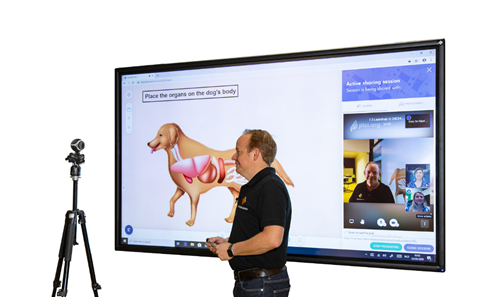
The most common failure point in hybrid classrooms is visibility — remote learners can't see what's on the board, and in-person learners can't see their remote peers' faces clearly. Addressing this requires decisions at both the camera and display level:
- A wide-angle camera positioned at the back or front of the room (depending on setup) that captures all in-person students, not just the teacher. Remote learners need to see who is speaking during discussion, not just the instructor.
- A large display — ideally wall-mounted and at least 65 inches diagonal — showing remote participants' video feeds so in-person students can see their peers' faces and nonverbal cues
- A secondary display or screen-sharing setup so remote learners can see whatever the teacher is writing, presenting, or demonstrating, independent of the main camera feed
- Writable wall surfaces (glass boards, porcelain steel panels) that are well-lit and within the camera's field of view — an amazing lesson written on a whiteboard that remote learners can't read clearly is a lost instructional moment
Whiteboards and glass boards positioned within the camera frame are a frequently overlooked but high-impact detail. See our post on how to clean dry erase whiteboards and glass boards for maintenance guidance that keeps surfaces legible on camera.
2. Audio: the non-negotiable foundation
Audio quality has a greater impact on hybrid classroom effectiveness than almost any other single factor. Research consistently shows that when audio is poor, remote learners disengage within minutes — not because they lack interest, but because sustained concentration against noise or garbled audio is cognitively exhausting.
The audio infrastructure of a well-designed hybrid classroom includes:
- A ceiling or tabletop microphone array — not a single desktop mic or a laptop's built-in microphone. An omnidirectional microphone array captures student voices from anywhere in the room and makes remote learners full participants in classroom discussion, not just lectures
- A speaker system positioned to project remote audio into the room — when remote learners speak and their voices come through a clear room speaker, they become present in the physical space in a meaningful way. Laptop speakers don't accomplish this
- Acoustic management for the physical space — hard floors, bare walls, and high ceilings create echo that degrades both in-room and recorded audio. Soft seating, rugs, wall panels, and acoustic ceiling treatments significantly improve audio quality without expensive renovation
3. Furniture: designing for simultaneous audiences
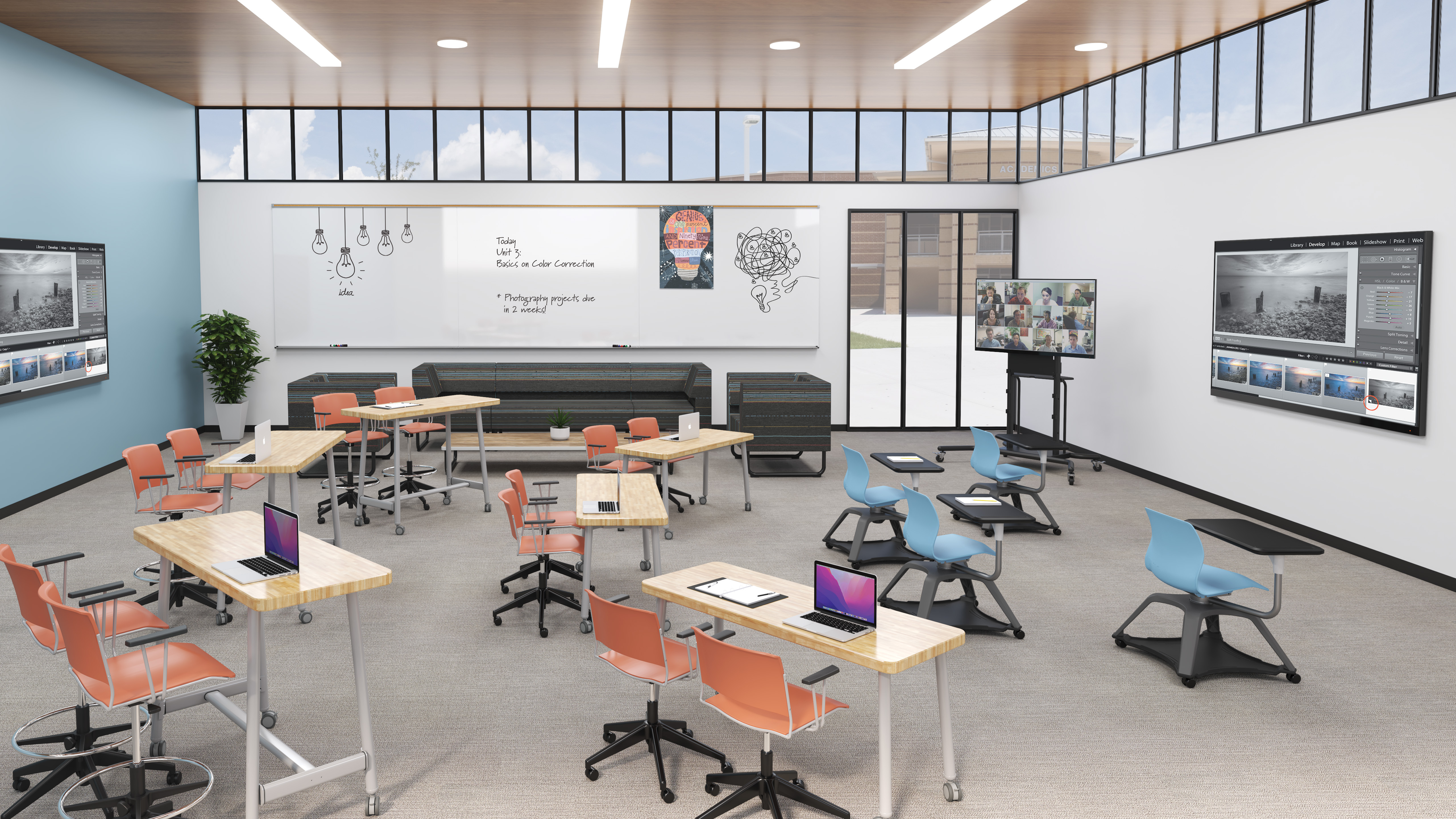
The furniture decisions in a hybrid classroom serve a different set of constraints than a traditional classroom. The layout must work for the in-person students while also being legible and navigable on camera for remote learners. Key principles:
- Camera-conscious seating arrangements — semicircular or pod arrangements work better on camera than traditional rows because they allow the wide-angle camera to capture faces rather than the backs of heads. They also make in-person discussion more natural, which improves the experience for remote learners watching.
- Height-adjustable and mobile tables — the hybrid classroom needs to reconfigure quickly between synchronous sessions, small-group work, and individual tasks. Caster-equipped tables that students can rearrange in minutes, without teacher direction, are essential for maintaining instructional momentum in a format that is already logistically complex.
- A mobile teacher workstation — the teacher in a hybrid classroom is managing two audiences simultaneously. A mobile workstation that can move to face the camera, the in-person group, or a display surface gives the teacher physical flexibility that a fixed desk eliminates. It also keeps the teacher visible on camera when working at their station, which matters for remote learners who use visual cues to gauge pacing and attention.
- Clear pathways and open sightlines — a cluttered or maze-like room layout creates dead zones where the camera can't see students and where the teacher can't circulate easily. A hybrid classroom should have unobstructed pathways between every student zone and the teacher, and the camera should have line of sight to every seating position.
For a deeper look at the furniture options that support flexible, camera-friendly layouts, see our post on 8 ways to incorporate flexible seating into the classroom.
4. Instructional infrastructure: platforms and protocols
Technology and furniture are necessary but not sufficient. A hybrid classroom only works when the instructor has clear protocols for managing two audiences and the platform infrastructure to support them. Essential elements:
- A video conferencing platform that all students can reliably access, with stable institutional licensing (not individual free-tier accounts that hit time limits mid-class)
- A learning management system (LMS) where all course materials, assignments, and recorded sessions live — so that both in-person and remote students have equal access to content
- Clear communication norms established from day one: how remote students signal that they want to speak, how the teacher alternates attention between audiences, how small-group work includes remote participants
- Recorded session archives for asynchronous participants — even in a synchronous hybrid model, recording sessions ensures that students who experience technical issues don't miss content permanently
Edutopia's research on hybrid instruction notes that the most successful hybrid teachers treat their remote learners as a distinct audience with specific needs, rather than as a secondary stream attached to an in-person class. That mindset shift — from 'classroom with a camera' to 'two audiences, one lesson' — is what separates functional hybrid classrooms from genuinely effective ones.
The Hybrid Classroom and Cohort-Based Learning
One of the most effective implementations of hybrid learning at the K-12 level combines the hybrid model with a classroom cohort structure. Rather than dividing students arbitrarily between in-person and remote attendance, cohort-based hybrid scheduling assigns consistent small groups to each attendance mode. Group A attends in-person on Monday and Wednesday; Group B attends in-person on Tuesday and Thursday. Both groups know their schedule, build relationships within their cohort, and experience the same instructional content through different delivery modes on different days.
This approach preserves the social-emotional benefits of small-group consistency while making hybrid logistics more manageable for teachers — they're not managing an unpredictable split every session, they're executing a known rotation with familiar groups.
Designing Your Hybrid Classroom With MooreCo
A hybrid classroom isn't defined by any single piece of technology — it's defined by how well the physical space, furniture, and instructional design work together to serve both audiences equally. MooreCo's furniture and visual communication products are built around this principle: flexible, durable, and designed to support the full range of modern teaching models.
Whether you're outfitting a single hybrid-enabled classroom or redesigning an entire wing of your school for flexible instruction, our team can help. Explore our product range at moorecoinc.com, or contact our design team to discuss your specific space and student population.
Topics: Collaboration, Design, Active Learning, Active Classroom, Technology, Hybrid Classroom, Thrive, Learning Styles, Educators